
How to Join the Discord Community
If you’ve ever heard your mates talking about “jumping on Discord” and thought it sounded like some secret underground bunker for gamers, no worries as we’ve got you covered. It’s basically a big online hangout where you can chat, share updates, and keep in touch with your crew and key interests that you have.
If you want to get involved with Joe Fortune’s Discord community, this guide will walk you through it step-by-step. No headaches. No tech wizardry. Just a simple fair dinkum rundown anyone can follow.
Already know how Discord works? Join with the link below!

Downloading Discord and Creating an Account
Before you can join the server, you’ll need Discord itself. Think of it like grabbing the keys before hopping in the car.
Download the Discord App
Discord works on pretty much everything phone, laptop, tablet, whatever you’ve got which is hand, here’s the easy way to get it:
- On your phone: Head to the App Store (iPhone) or Google Play Store (Android) and search for “Discord”.
- On a computer: Go to the Discord website and download the desktop app.
- Or skip the download: If you can’t be bothered installing anything, you can use Discord directly in your web browser that can be Chrome, Safari, Edge, whatever you prefer. Once you’ve got it open, you’re ready for the next step.
Create Your Discord Account
Discord won’t let you in without an account, same as your local RSL or SLSC won’t admit you without ID. Setting one up only takes a minute:
- Hit “Sign Up”
- Enter your email, username, and a password
- Confirm your email, they’ll send you a quick link
Choose a username you’re happy with, people on the server will see it, and you’ll be using it whenever you chat so best you choose something you’re good to let others call you!
Joining the Server and Getting Set Up
Alright, now for the good stuff. You’ve got Discord. You’ve got an account. Time to stroll into the Joe Fortune community like a legend.
Accept the Invite
You’ll need a Discord invite link this is usually something that starts with discord.gg/… Click the invite link and Discord will ask if you want to join the server. Hit “Accept Invite”, and boom, sweet, you’re in. If you’re on your phone, the app will open automatically. On a computer, it may ask whether to launch the app or use the browser. Either works fine.
Verify Your Age (18+)
Because Joe Fortune is strictly for adults, you must be 18 or older. Some Discord servers run automatic age checks. That might include:
- Ticking a box confirming you’re 18+
- Passing a bot verification
- Accepting an age-gate message when you first join
If you see a message pop up asking for age confirmation, just follow the prompts. It only takes a few seconds.
Read the Server Rules
Before you go charging in like Leeroy Jenkins, we reckon you should take a moment to read the server rules. You’ll usually find them in a channel called #rules, #welcome, or something similar. Why bother? Because reading the rules can save you from getting muted, kicked, or accidentally annoying the mods. Most rules are common sense anyway that you will be familiar with:
- Be respectful
- No spam
- Keep chats on-topic
- Don’t post anything dodgy
- Tick the acknowledgement (if required), and you’re good to go.
Explore the Server
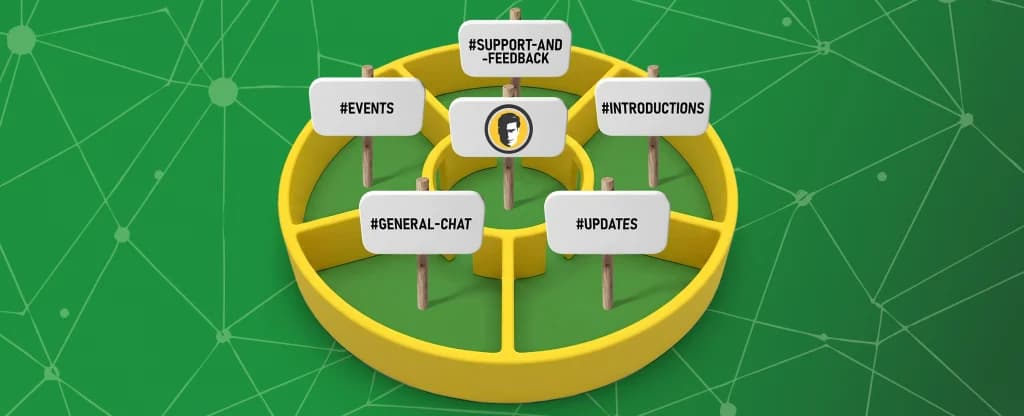
Now that you’ve officially joined, it’s time to take a stroll around. Every Discord server is split up into channels kind of like different rooms in a pub. One room might be for chatting, another for announcements, another for support. Here are the key ones you’ll want to check out:
#updates
This is where the big news drops announcements, new features, promos, or anything important happening in the Joe Fortune community. Think of it like the chalkboard at your local with all the specials only digital. Drop in here regularly to stay in the loop.
#general-chat
This is the main hangout spot. Got something on your mind? Want to yarn with other members? Post it here. It’s casual, friendly, and perfect for those “What’s everyone up to?” kind of chats. Just remember no one likes a keyboard warrior after six beers.
#introductions
If you’re new, this is the perfect place to say g’day. Share a bit about yourself, nothing too personal just enough so people know who they’re talking to. You don’t have to go full autobiography; even a simple: “Hey legends, I’m Joe, big NRL and AFL fan, happy to be here.”
…is more than enough. This channel helps break the ice and makes the whole community feel more welcoming.
#events
This is where you’ll find info about:
- Giveaways
- Live hangs or streams
- Celebrations
- Special events
- Community challenges
- If something fun is happening, it’ll be posted here.
#support-and-feedback
Got a question? Need a hand? Something not working right? This is the channel to visit. The support crew keep an eye on it, and other community members might jump in to help too. Here are some common things you might ask about:
- Queries about how Discord works
- Account stuff
- Server questions
- Suggestions for new features or improvements
- Be clear about what you need, and someone will sort you out.
Final Thoughts
Before you go exploring on your own, here are a few handy pointers to make your Discord life easier:
1. Notifications can get hectic
If your phone starts buzzing like a busy beehive, head to Notification Settings. You can mute channels, mute the entire server, or only get pings when someone tags you.
2. Don’t fall for dodgy links
Just like anywhere online, only click links from trusted sources (like the official updates channel).
3. Be patient with the mods
They’re not there to nag you, they’re there to keep the place clean, friendly, and fun.
4. Have a play around
Click things, explore menus, try voice chat, change your profile picture, Discord’s pretty forgiving, so you’re not likely to break anything.
- Ready to Join In
So, whether you’re there for the chats, the updates, or just to hang out with like-minded legends, the Joe Fortune community is the perfect place to get involved.